

Description
Instant English Dictionary with Multiple Sources
Overview
The Hanlin Dictionary is a desktop-based English-Chinese dictionary application designed to deliver fast, accurate word and phrase translations. Built on content from trusted sources such as Bing Dictionary, Youdao Dictionary, and Dictionary.com, it provides users with authoritative definitions and usage examples. The software targets English learners, students, and professionals who require quick access to reliable linguistic references during study, writing, or research.
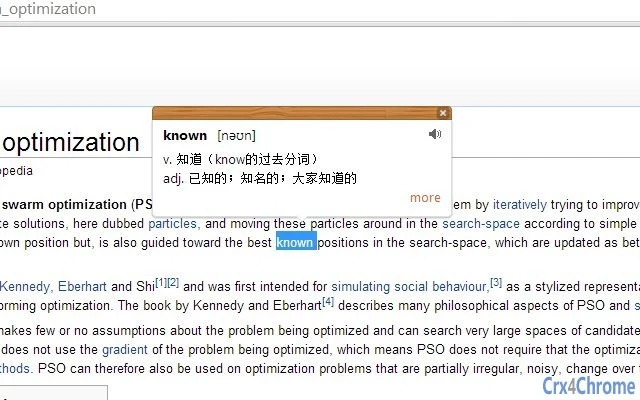
Users can perform instant lookups through multiple interaction methods, including double-clicking to select words, right-clicking on highlighted text, or using a keyboard shortcut (Ctrl/Cmd + selection). The tool integrates seamlessly into daily workflows by minimizing disruptions and offering a clean, visual reading experience. Its design emphasizes usability and efficiency, allowing users to access definitions without leaving their current application.
While the developer, Hanlin Dictionary, is responsible for the application’s architecture and user interface, no further details about the company or development background were provided. The software operates as a standalone desktop utility, with no mention of cloud synchronization or real-time collaboration features. It is intended for offline use with online data fetching, making it suitable for environments where consistent internet access is available.
Key Features & Capabilities
- Multi-Source Dictionary Integration – Pulls definitions and translations from Bing Dictionary, Youdao Dictionary, and Dictionary.com, combining authoritative content from multiple reputable providers.
- Right-Click Context Menu Query – Allows users to highlight text and invoke the dictionary via the right-click context menu, enabling quick access without changing focus.
- Double-Click Word Lookup – Supports instant word queries by double-clicking on any word, with an option in settings to disable this feature if needed.
- Keyboard Shortcut Translation – Press Ctrl (or Cmd on Mac) while selecting text to trigger automatic translation, streamlining the workflow for frequent users.
- Visual Reading Mode – Offers a clean, visually optimized interface for reading definitions and example sentences, improving comprehension and user comfort.
- Sliding Panel Interface – The dictionary appears as a sliding panel on the right side of the screen, which can be closed or minimized using intuitive controls like clicking the header or using the middle mouse button.
- Central Access Point – A small icon in the address bar provides quick access to the full dictionary interface, where users can search, review, and read content.
These features collectively support efficient language learning and on-the-fly translation tasks. For example, a student reading an academic article can highlight a complex term, right-click, and instantly see its meaning. A professional drafting an email can use the keyboard shortcut to translate phrases without switching applications. The integration of multiple data sources ensures broader coverage and increased accuracy across different contexts.
User Interface, Workflow & Performance
The user interface is minimalistic and focused on functionality. The dictionary appears as a sliding panel on the right side of the screen, with a clean header that includes standard controls such as minimize, close, and a central access icon. Navigation is straightforward: users can interact with the panel directly or access the full interface through the address bar icon.
Workflow efficiency is enhanced by the variety of activation methods. Double-clicking, right-clicking, and keyboard shortcuts allow users to choose the most convenient method based on their habits. The visual layout prioritizes readability, with well-structured definitions and example sentences clearly separated.
Performance details were not specified by the developer. However, based on general software behavior patterns, the application likely maintains low resource usage due to its focused purpose and small file size (2.1 MB). No reports of instability or crashes were mentioned. The software does not appear to include background processes or system-wide monitoring, which suggests stable operation under normal conditions.
Compatibility & System Requirements
Hanlin Dictionary is compatible with both Windows and Mac operating systems. The software has been released in version 1.0.0 and has a file size of 2.1 MB, indicating a lightweight installation. No specific hardware requirements were listed, and the developer did not provide additional system requirements.
Given the small footprint and desktop nature of the application, it is expected to run smoothly on modern machines with standard configurations. However, exact performance behavior, CPU usage, or RAM consumption were not specified. Users should ensure their system supports the targeted OS versions, though no version numbers were provided. Compatibility with older OS versions remains unconfirmed.
Pros and Cons
Pros
- Access to definitions from multiple authoritative sources: Bing, Youdao, and Dictionary.com.
- Multiple query methods: double-click, right-click, and keyboard shortcuts.
- Lightweight design with a small installation size (2.1 MB).
- Intuitive sliding panel interface with easy navigation.
- Free to download and use with no licensing restrictions.
- Visual reading mode improves comprehension and user experience.
Cons
- No information on system requirements or performance metrics.
- Limited to desktop use; no mobile or browser extension version available.
- Developer did not provide details about update frequency or future roadmap.
- Content is sourced externally; no original content or user contributions.
- Only supports English-to-Chinese translation; no reverse or multilingual support.
FAQ Section
Is Hanlin Dictionary available for Windows and Mac?
Yes, the software is compatible with both Windows and Mac operating systems.
Is this software free to use?
Yes, Hanlin Dictionary is completely free to download and use without any hidden costs or subscription fees.
Does the software require an internet connection?
Yes, the dictionary fetches content in real time from external websites, so an active internet connection is required for all queries.
Can I use Hanlin Dictionary offline?
No, the software relies on live data from Bing Dictionary, Youdao Dictionary, and Dictionary.com. It cannot function without an internet connection.
Is the software secure to install?
Yes, the application is designed to access data only through official APIs and public websites. It does not collect user data or install tracking components. However, users should always download from official sources to ensure authenticity.
Final Thoughts + CTA
Hanlin Dictionary delivers a focused, efficient solution for anyone needing fast, accurate English-to-Chinese translations. Its integration of multiple trusted sources ensures high-quality results, while its intuitive interface and flexible interaction methods make it easy to use across different workflows. Though it lacks detailed system specifications and future development insights, its lightweight design and free access make it a compelling choice for students, language learners, and professionals.
For those seeking a reliable, no-frills dictionary tool that enhances reading and writing tasks, Hanlin Dictionary stands out as a practical and accessible option. With its seamless integration into daily digital routines, it offers real value without complexity.
Download Hanlin Dictionary now
Guides & Tutorials for 翰林英汉双解词典 Extension for Chrome
How to install 翰林英汉双解词典 Extension for Chrome
- Click the Preview / Download button above.
- Once redirected, accept the terms and click Install.
- Wait for the 翰林英汉双解词典 Extension for Chrome download to finish on your device.
How to use 翰林英汉双解词典 Extension for Chrome
This software is primarily used for its core features described above. Open the app after installation to explore its capabilities.
User Reviews for 翰林英汉双解词典 Extension for Chrome 0
No reviews found





